
Software development is evolving faster than ever, and the tools developers use are evolving right along with it. In 2026, Integrated Development Environments (IDEs) are no longer just code editors—they’ve become intelligent productivity hubs powered by AI, cloud collaboration, and advanced automation.



Whether you’re a beginner writing your first lines of code, a web developer building modern applications, or an enterprise engineer managing large-scale systems, choosing the right IDE can dramatically impact your productivity.
In this guide, we’ll explore the most popular IDEs in 2026, why developers prefer them, and how to choose the best one for your projects.
What Is an IDE?
An Integrated Development Environment (IDE) is a software application that combines everything developers need to write, test, debug, and manage code in one place.
Most modern IDEs include:
- A source code editor
- Debugging tools
- Build automation features
- Version control integration
- AI-powered coding assistance
- Plugin and extension support
The goal is simple: help developers write better code faster.
What Makes an IDE Popular in 2026?
The IDE market has changed significantly over the last few years. Developers are no longer looking only for syntax highlighting and debugging tools. Today’s most popular IDEs offer much more.
AI-Powered Development
Artificial intelligence has become a core feature of modern development environments. Developers now rely on AI for:
- Code completion
- Bug detection
- Code explanation
- Refactoring suggestions
- Documentation generation
Speed and Performance
Nobody wants to wait for an IDE to load. Fast startup times and smooth performance are now essential.
Cloud and Remote Development
With remote work becoming standard, cloud-based development environments and remote coding features are more important than ever.
Rich Extension Ecosystems
Developers love customization. IDEs with extensive plugin marketplaces tend to attract larger communities.
Team Collaboration
Built-in collaboration tools help development teams work together more effectively, regardless of location.
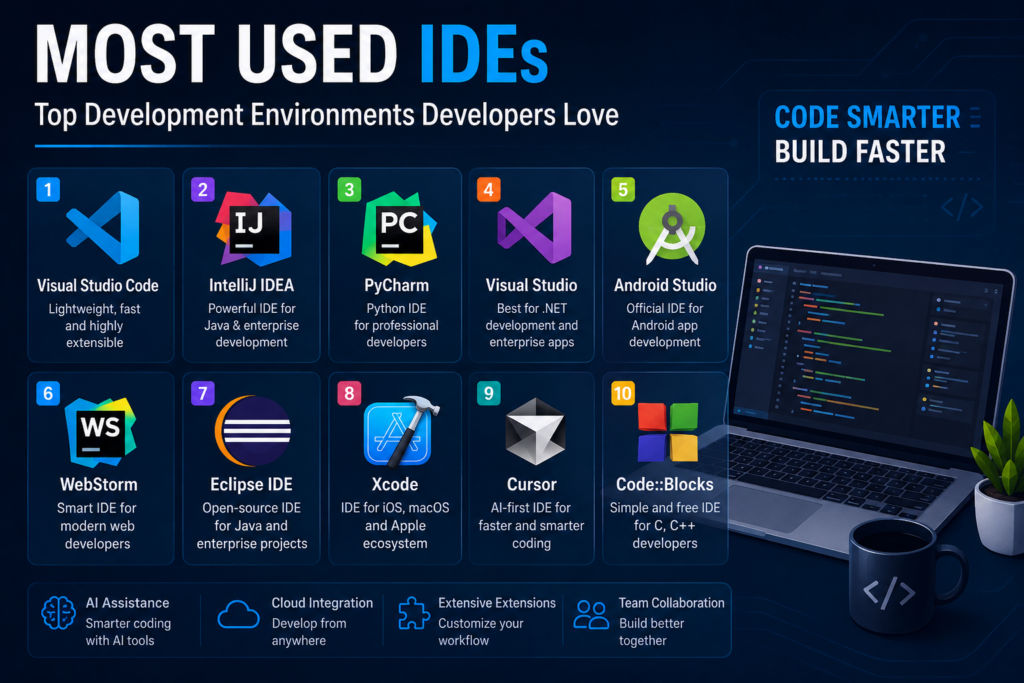
Top 10 Most Used IDEs in 2026
1. Visual Studio Code
Visual Studio Code (VS Code) continues to dominate the developer world in 2026. Its combination of speed, flexibility, and a massive extension ecosystem makes it the go-to choice for millions of programmers.
Why Developers Love It
- Lightweight and fast
- Thousands of extensions available
- Excellent Git integration
- Strong AI coding support
- Works on Windows, macOS, and Linux
Best For
- Web development
- Full-stack projects
- Cloud development
- General programming
2. IntelliJ IDEA
When it comes to professional Java development, IntelliJ IDEA remains a favorite among developers and enterprise teams.
Its intelligent code analysis and productivity features save developers countless hours every week.
Key Features
- Advanced refactoring tools
- Smart code completion
- Excellent framework support
- Powerful debugging capabilities
Best For
- Java development
- Kotlin projects
- Enterprise applications
3. PyCharm
Python’s popularity continues to grow, especially in AI, machine learning, and data science. That’s one reason PyCharm remains one of the most widely used IDEs in 2026.
Why It Stands Out
- Purpose-built for Python
- Integrated data science tools
- Jupyter Notebook support
- Powerful debugging and testing features
Best For
- Python development
- Machine learning
- Data science
- Automation projects
4. Visual Studio
Visual Studio remains a powerhouse for developers working within Microsoft’s ecosystem.
From enterprise software to game development, it continues to provide one of the most complete development experiences available.
Popular Features
- Industry-leading debugger
- Deep .NET integration
- Built-in productivity tools
- Strong enterprise support
Best For
- C# development
- Enterprise software
- Desktop applications
- Game development
5. Android Studio
Android Studio continues to be the official choice for Android app development.
As Android remains the world’s most popular mobile operating system, Android Studio is still essential for mobile developers.
Key Advantages
- Official Google support
- Android device emulators
- Visual layout editor
- Performance analysis tools
Best For
- Android application development
- Mobile app testing
- Kotlin and Java development
6. WebStorm
WebStorm remains one of the best IDEs for frontend and full-stack developers.
It provides exceptional support for modern JavaScript frameworks and tools.
Why Developers Choose It
- Intelligent JavaScript coding assistance
- TypeScript optimization
- Framework support for React, Angular, and Vue
- Integrated testing features
Best For
- Frontend development
- Full-stack web applications
- JavaScript and TypeScript projects
7. Eclipse IDE
Although newer tools have emerged, Eclipse continues to have a strong presence in enterprise environments.
Many organizations still rely on Eclipse for maintaining and developing large Java applications.
Notable Features
- Open-source platform
- Highly customizable
- Extensive plugin library
- Mature development ecosystem
Best For
- Enterprise Java applications
- Legacy system maintenance
- Large development teams
8. Xcode
If you’re building apps for Apple devices, Xcode remains a must-have.
It is the official IDE for developing applications across Apple’s ecosystem.
Core Features
- Swift development support
- Interface Builder
- Apple simulators
- Integrated performance tools
Best For
- iOS development
- macOS applications
- Apple ecosystem projects
9. Cursor
Cursor has become one of the hottest names in software development.
Unlike traditional IDEs, Cursor was designed with AI at its core, helping developers write code faster through natural language interactions.
Why It’s Growing Fast
- AI-first development workflow
- Context-aware code generation
- Intelligent debugging
- Natural language coding assistance
Best For
- AI-assisted programming
- Rapid prototyping
- Modern software teams
10. Code::Blocks
Code::Blocks remains a reliable option for C and C++ developers, particularly students and those learning programming fundamentals.
Benefits
- Lightweight design
- Open-source and free
- Easy to configure
- Excellent for educational environments
Best For
- C programming
- C++ development
- Learning programming concepts
IDE Comparison Table
| IDE | Best For | AI Features | Cost |
|---|---|---|---|
| Visual Studio Code | General Development | Excellent | Free |
| IntelliJ IDEA | Java & Enterprise | Advanced | Freemium |
| PyCharm | Python & AI | Advanced | Freemium |
| Visual Studio | .NET Development | Advanced | Freemium |
| Android Studio | Android Apps | Good | Free |
| WebStorm | Web Development | Advanced | Paid |
| Eclipse | Enterprise Java | Moderate | Free |
| Xcode | Apple Development | Good | Free |
| Cursor | AI-Assisted Coding | Excellent | Freemium |
| Code::Blocks | C/C++ Development | Basic | Free |
Emerging IDE Trends in 2026
The future of development environments is exciting. Several trends are shaping the next generation of IDEs.
AI-Native Coding
AI is no longer an add-on feature. It’s becoming the foundation of how developers write and manage code.
Cloud-Based Development
More developers are working directly from cloud environments, reducing hardware limitations and improving accessibility.
Real-Time Collaboration
Collaborative coding is becoming standard, allowing teams to work together in real time.
Built-In Security
Modern IDEs increasingly include vulnerability scanning and security analysis tools.
Low-Code Integration
Many development environments are incorporating low-code tools to accelerate software delivery.
How to Choose the Right IDE
There’s no single “best” IDE for everyone. The ideal choice depends on your goals and workflow.
Choose Visual Studio Code If:
- You want flexibility
- You work with multiple languages
- You prefer a lightweight environment
Choose PyCharm If:
- Python is your primary language
- You work in data science or AI
Choose IntelliJ IDEA If:
- You develop enterprise Java applications
- You need advanced productivity tools
Choose Android Studio If:
- You build Android applications
Choose Xcode If:
- You create apps for Apple devices
Choose Cursor If:
- You want an AI-first development experience
Final Thoughts
The most-used IDEs in 2026 reflect the changing nature of software development. While Visual Studio Code continues to lead the market, specialized tools such as PyCharm, IntelliJ IDEA, Android Studio, and Xcode remain essential for developers in specific ecosystems.
At the same time, AI-powered platforms like Cursor are redefining what developers expect from their coding environments.
The best IDE isn’t necessarily the most popular one—it’s the one that helps you work faster, write better code, and enjoy the development process. Take time to explore your options, experiment with different tools, and choose the environment that best fits your workflow.
Which IDE do you use most in 2026? Let us know in the comments below!
